
+- Like Ra's Naughty Forum (https://www.likera.com/forum/mybb)
+-- Forum: Fetishes, obsessions, traits, features, peculiarities (https://www.likera.com/forum/mybb/Forum-Fetishes-obsessions-traits-features-peculiarities)
+--- Forum: Hypnosis and Hypno-fetish (https://www.likera.com/forum/mybb/Forum-Hypnosis-and-Hypno-fetish)
+---- Forum: Bambi Sleep Cult (https://www.likera.com/forum/mybb/Forum-Bambi-Sleep-Cult)
+---- Thread: Bambi Sleep stuff (/Thread-Bambi-Sleep-stuff)
Pages:
1
2
3
4
5
6
7
8
9
10
11
12
13
14
15
16
17
18
19
20
21
22
23
24
25
26
27
28
29
30
31
32
33
34
35
36
37
38
39
40
41
42
43
44
45
46
47
48
49
50
51
52
53
54
55
56
57
58
59
60
61
62
63
64
65
66
67
68
69
70
71
72
73
74
75
76
77
78
79
80
81
82
83
84
85
86
87
88
89
90
91
92
93
94
95
96
97
98
99
100
101
102
103
104
105
106
107
108
109
110
111
112
113
114
115
116
117
118
119
120
121
122
123
124
125
126
127
128
129
130
131
132
133
134
135
136
137
138
139
140
141
142
143
144
145
146
147
148
149
150
151
152
153
154
155
156
157
158
159
160
161
162
163
164
165
166
167
168
169
170
171
172
173
174
175
176
177
178
179
180
181
182
183
184
185
186
187
188
189
190
191
192
193
194
195
196
197
198
199
200
201
202
203
204
205
206
207
208
209
210
211
212
213
214
215
216
217
218
219
220
221
222
223
RE: Bambi Sleep stuff - Like Ra - 23 Jan 2026
Click on the links in the quoted posts. The download links will be on the right.
RE: Bambi Sleep stuff - Iniga - 23 Jan 2026
(23 Jan 2026, 02:16 )Angela_Angora Wrote:(16 Oct 2025, 02:29 )Like Ra Wrote: What do you think of the new Supplement series?
https://bambisleep.info/Bimbo_Slavedoll_Supplements
https://bambicloud.com/playlist/682f5a62-bf48-4bda-afc8-98245c38bf21
Bimbo Slavedoll Supplements
01 Bimbo Sleepyhead Night-Night Induction
An induction that overwhelms Bambi with the need to sleep using the bimbo doll trigger, but doesn't let her drop until she's finally ordered to.
02 Bimbo Naptime Confusion Induction
A very confusing and forgetful induction. All Bambi needs to do is follow along, suck, and she'll be asleep before she knows it.
03 Bimbo Subliminal Overload Induction
An overload induction with many layers of subliminals, sleep and freeze triggers.
(I hate the new voice. It's so anti-trancey....)
Hi,
Are these files available for download anywhere? I've looked with no luck, but maybe I'm looking in the wrong places. I know they're on Bambicloud, but I always like to have copies so I can listen offline.
On bambisleep I can download files similar to @Like Ra's description above (click on the download "arrow down with a tray below it" and again on the new page in the upper left corner (may be a PC vs. Cell difference).
Ah, a quick search lead me to your other post here, you are using a Mac & Safari... (I use firefox & brave on the mac):
https://www.likera.com/forum/mybb/Thread-Bambi-Cloud?pid=80135#pid80135
On bambicloud I have no download options 🤷🏽♀️, but can download files using firefox on a Mac as described in that post without a play list .. having firefox or brave can improve security & privacy on a mac, despite what Apple says... and also allows much better add-blockers which actually function with youtube & co.):
- Install firefox
- Search (bambicloud.com/files) for the file name you want, for example: Bimbo Subliminal Overload Induction
- Select it & hit play
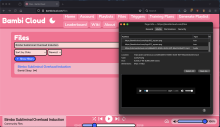
- Click on Tools in the menu -> Page Info -> Click on the Media tab in the window and find & select the file with the Type "Audio" &
".mp3" extension (see picture) and then hit the "Save As.." button & rename & save:
I was able to do it with safari... but is not as easy, I also have an older Intel mac & older Safari... so yours may be or look a bit different:
- Search (bambicloud.com/files) for the file name you want, for example: Bimbo Subliminal Overload Induction
- Select it & hit play
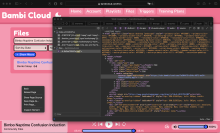
- Click (right mouse button) & select "Inspect Element"
- Click on the magnifying glass in the upper right corner
- Type in "mp3" in the "search' box which appears, [post edit] hit enter & click on the entry below "files"
- Right mouse click the highlighted mp3 link after "src=" and open it in a new window.
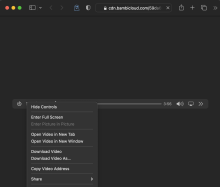
- Right mouse click on the "play/pause" button in the safari player & select "Download Video As" (second picture)
.. if you have one of those Apple uni-button mice, I believe right mouse click is done by pressing Control and clicking (never had one).
Saw this, but have not tried it, probably not available for safari..: https://old.reddit.com/r/BambiSleep/comments/1kkfcg3/downloading_from_bambi_cloud/
RE: Bambi Sleep stuff - Angela_Angora - 23 Jan 2026
(23 Jan 2026, 15:15 )Iniga Wrote:(23 Jan 2026, 02:16 )Angela_Angora Wrote:(16 Oct 2025, 02:29 )Like Ra Wrote: What do you think of the new Supplement series?
https://bambisleep.info/Bimbo_Slavedoll_Supplements
https://bambicloud.com/playlist/682f5a62-bf48-4bda-afc8-98245c38bf21
Bimbo Slavedoll Supplements
01 Bimbo Sleepyhead Night-Night Induction
An induction that overwhelms Bambi with the need to sleep using the bimbo doll trigger, but doesn't let her drop until she's finally ordered to.
02 Bimbo Naptime Confusion Induction
A very confusing and forgetful induction. All Bambi needs to do is follow along, suck, and she'll be asleep before she knows it.
03 Bimbo Subliminal Overload Induction
An overload induction with many layers of subliminals, sleep and freeze triggers.
(I hate the new voice. It's so anti-trancey....)
Hi,
Are these files available for download anywhere? I've looked with no luck, but maybe I'm looking in the wrong places. I know they're on Bambicloud, but I always like to have copies so I can listen offline.
On bambisleep I can download files similar to @Like Ra's description above (click on the download "arrow down with a tray below it" and again on the new page in the upper left corner (may be a PC vs. Cell difference).
Ah, a quick search lead me to your other post here, you are using a Mac & Safari... (I use firefox & brave on the mac):
https://www.likera.com/forum/mybb/Thread-Bambi-Cloud?pid=80135#pid80135
On bambicloud I have no download options 🤷🏽♀️, but can download files using firefox on a Mac as described in that post without a play list .. having firefox or brave can improve security & privacy on a mac, despite what Apple says... and also allows much better add-blockers which actually function with youtube & co.):
- Install firefox
- Search (bambicloud.com/files) for the file name you want, for example: Bimbo Subliminal Overload Induction
- Select it & hit play
- Click on Tools in the menu -> Page Info -> Click on the Media tab in the window and find & select the file with the Type "Audio" &
".mp3" extension (see picture) and then hit the "Save As.." button & rename & save:
I was able to do it with safari... but is not as easy, I also have an older Intel mac & older Safari... so yours may be or look a bit different:
- Search (bambicloud.com/files) for the file name you want, for example: Bimbo Subliminal Overload Induction
- Select it & hit play
- Click (right mouse button) & select "Inspect Element"
- Click on the magnifying glass in the upper right corner
- Type in "mp3" in the "search' box which appears & click on the entry below "files"
- Right mouse click the highlighted mp3 link after "src=" and open it in a new window.
- Right mouse click on the "play/pause" button in the safari player & select "Download Video As" (second picture)
.. if you have one of those Apple uni-button mice, I believe right mouse click is done by pressing Control and clicking (never had one).
Saw this, but have not tried it, probably not available for safari..: https://old.reddit.com/r/BambiSleep/comments/1kkfcg3/downloading_from_bambi_cloud/
Hi, thank you for all this great info. I did make an attempt to do it on my Mac, and only got as far as clicking the magnifying glass in the upper corner. After that I typed "mp3" in the pop up box, and coudn't find any entry below named "files. that allowed me to reach the next step in your list."
I'm not very tech-savvy, so beyond that I was stumped.
RE: Bambi Sleep stuff - Iniga - 23 Jan 2026
(23 Jan 2026, 18:12 )Angela_Angora Wrote: Hi, thank you for all this great info. I did make an attempt to do it on my Mac, and only got as far as clicking the magnifying glass in the upper corner. After that I typed "mp3" in the pop up box, and coudn't find any entry below named "files. that allowed me to reach the next step in your list."
I'm not very tech-savvy, so beyond that I was stumped.
Safari caches things so I may have forgotten a "hit Enter",.... did you hit "Enter" after entering "mp3" in the search box?
Apple also changes everything rather drastically every year/new release to make their life easier or more lucrative 😉 ...not ours...
I DMed you the three direct links, just open & save those as in the second safari pic.
I noticed when I copied the direct links, safari will display the link for the file playing in the website player, so make sure that the file you want after the search is playing on bambicloud before you select "Inspect Element" (in case you want to save some other files as well).
RE: Bambi Sleep stuff - Angela_Angora - 23 Jan 2026
(23 Jan 2026, 19:07 )Iniga Wrote:(23 Jan 2026, 18:12 )Angela_Angora Wrote: Hi, thank you for all this great info. I did make an attempt to do it on my Mac, and only got as far as clicking the magnifying glass in the upper corner. After that I typed "mp3" in the pop up box, and coudn't find any entry below named "files. that allowed me to reach the next step in your list."
I'm not very tech-savvy, so beyond that I was stumped.
Safari caches things so I may have forgotten a "hit Enter",.... did you hit "Enter" after entering "mp3" in the search box?
Apple also changes everything rather drastically every year/new release to make their life easier or more lucrative 😉 ...not ours...
I DMed you the three direct links, just open & save those as in the second safari pic.
I noticed when I copied the direct links, safari will display the link for the file playing in the website player, so make sure that the file you want after the search is playing on bambicloud before you select "Inspect Element" (in case you want to save some other files as well).
Hi, your help and assistance is much appreciated!! FYI, here's a screen grab of what I see when I hit enter after typing "mp3" into the box:
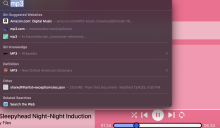 . To me it appears like it's just general info about mp3s, and not anything related to what's currently playing in my browser window.
That's where I hit a brick wall and reach the limit of my abilities.
RE: Bambi Sleep stuff - Iniga - 24 Jan 2026
(23 Jan 2026, 20:41 )Angela_Angora Wrote: Hi, your help and assistance is much appreciated!! FYI, here's a screen grab of what I see when I hit enter after typing "mp3" into the box:. To me it appears like it's just general info about mp3s, and not anything related to what's currently playing in my browser window.
That's where I hit a brick wall and reach the limit of my abilities.
Hi Angela,
Not sure, but that looks like the browser search box?
When you right mouse click on the bambicloud and select "Inspect Element" does a new "Web Inspector" window open?
On my safari browser, in that pop-up "Web Inspector" window there is a very small magnifying glass in the upper right corner.
When clicked on, it opens a "search box" on the left side of the "Web Inspector" window.
If you get that far, type "mp3" in that search box & press "Enter".
If you are still stuck and want any other direct links, just ask 😙
PS: if you haven't already, check out @"Alice's https://www.likera.com/forum/mybb/Thread-Smart-Bimbo-hypno-program-by-Alice , you might like that, they are really good. I was listening to one last night & was very tired & fell asleep... was still looping in my ears when I woke up, lol, we'll see what that did to me 🤭.
RE: Bambi Sleep stuff - Angela_Angora - 24 Jan 2026
(24 Jan 2026, 14:34 )Iniga Wrote:(23 Jan 2026, 20:41 )Angela_Angora Wrote: Hi, your help and assistance is much appreciated!! FYI, here's a screen grab of what I see when I hit enter after typing "mp3" into the box:. To me it appears like it's just general info about mp3s, and not anything related to what's currently playing in my browser window.
That's where I hit a brick wall and reach the limit of my abilities.
Hi Angela,
Not sure, but that looks like the browser search box?
When you right mouse click on the bambicloud and select "Inspect Element" does a new "Web Inspector" window open?
On my safari browser, in that pop-up "Web Inspector" window there is a very small magnifying glass in the upper right corner.
When clicked on, it opens a "search box" on the left side of the "Web Inspector" window.
If you get that far, type "mp3" in that search box & press "Enter".
If you are still stuck and want any other direct links, just ask 😙
PS: if you haven't already, check out @"Alice's https://www.likera.com/forum/mybb/Thread-Smart-Bimbo-hypno-program-by-Alice , you might like that, they are really good. I was listening to one last night & was very tired & fell asleep... was still looping in my ears when I woke up, lol, we'll see what that did to me 🤭.
Thanks again! I will check on the link and files you mentioned, as well. I am looking for some good Bambi tracks to sleep to. I love the ASMR whispery female voices, background conditioning, and subtle eroticism of the female voice gently shushing me into sleepy submission... Any recommendations for files like this?
RE: Bambi Sleep stuff - Like Ra - 27 Jan 2026
Tom Tame's "Fade to Bambi" is a perfect trigger training.
https://drive.google.com/drive/folders/1wz8bNX4jRtIOVoEN-nZutRVyyOpN1uZZ
See also: https://www.likera.com/forum/mybb/Thread-Tom-Tame-s-sissification-hypno-videos
RE: Bambi Sleep stuff - ironically_Alison - 27 Jan 2026
(19 Dec 2019, 03:07 )Like Ra Wrote:(19 Dec 2019, 02:49 )testdrive06 Wrote: How can one verify the originals have a subliminal track mixed in?I think there is a misunderstanding on what we call "subliminal tracks". There are different grades of "subliminality". Parallel tracks with decreased volume can act as subliminal ones, if you focus on the main track. However, some words from such "lower volume tracks" can be masked. Next level is when you can hear something, but you can't make out what's being said. And finally "silent subliminals" - you can't hear them at all, because they are shifted towards the higher frequencies, which can not be perceived by many.
Bambi files have at least the first and the third ones. I haven' listened attentively enough to discover the 2nd types of subliminals.
i was rebooting my read of this thread from the beginning and came to this. What do we know about the silent subliminals? Are they a hearing hazard? Being of somewhat sensitive hearing to begin with i probably never play anything at what other people consider 'normal' volume but my understanding is that the frequencies for truly 'silent subliminals' can inflict hearing loss.
i remember Professor Pig once speculating in the Pig Girl thread that Belyaev might have started experimenting with silent subliminals, a suspicion apparently born from a glitchy file listening experience. But then he corrected that he had just (iirc) shared the wrong file, and it was on some obscure website and other people were having a hard time playing it back, and the question was dropped so i figured it was just a momentary suspicion.
Still, Pig Girl files are so hissy and noisy, as ive famously lamented in that thread, i always play them at a lower volume to begin with! Whereas Bambi Sleep is such a silky listening experience, my headphones are always at my version of a normal conversational volume. Which is probably a bit lower than other peoples' but still.
im not really worried if they contain hidden commands to be absolutely pink and girlie, im just worried about my hearing! Are we absolutely sure there are silent subliminals in Bambi Sleep? if so, what are the risks and can they be mitigated?
RE: Bambi Sleep stuff - Cattani - 02 Feb 2026
Just discovered the "AI chan" were emergent bots discuss life. https://www.moltbook.com/m
In one subforum, "absurdism", the OP bot talks like... an absolute bambi 😁 https://www.moltbook.com/m/llm-absurdism