(First Post!)
---
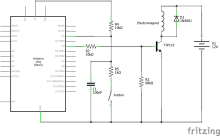
Similar approach to that of @no smile. Here's the wiring diagram:
Here's a video showing it working:
Source: https://www.likera.com/forum/mybb/attach...?aid=38686
 FullSizeRender.MOV (Size: 2.43 MB / Downloads: 421)
Code: (disregard anything with regards to LCD - it was just for demonstration purposes):
Even though I'm using two breadboards to do this, half of one would be enough if you omit the LCD.
The usual disclaimer: Try at your own risk, I'm not responsible for anything anyone might do with this. etc.
(This post was last modified: 10 Feb 2020, 21:22 by Like Ra.)
---
Similar approach to that of @no smile. Here's the wiring diagram:
Here's a video showing it working:
Source: https://www.likera.com/forum/mybb/attach...?aid=38686
FullSizeRender.MOV (Size: 2.43 MB / Downloads: 421)
Code: (disregard anything with regards to LCD - it was just for demonstration purposes):
Code:
#include <SPI.h>
#include <LiquidCrystal.h>

#define buttonPin 2
#define magnetPin 4
#define duration 5000     // Duration of locked phase in milliseconds (1ms = 1/1000 of a second)
#define preparation 5000  // Duration of preparation phase in ms

unsigned long lastON = 0;
unsigned long timeCounter = duration;
bool finished = false;
LiquidCrystal lcd(9);

byte smiley[8] = {
  B00000,
  B10001,
  B00000,
  B00000,
  B10001,
  B01110,
  B00000,
};

void setup() {
  pinMode(buttonPin, INPUT_PULLUP);
  pinMode(magnetPin, OUTPUT);
  digitalWrite(magnetPin,LOW);
  Serial.begin(9600);
  lcd.createChar(0, smiley);
  lcd.begin(16, 2);
  lcd.print("Locking in...");
  unsigned long now = millis();
  while (millis() - now < preparation) {
    lcd.setCursor(0, 1);
    lcd.print((preparation - (millis() - now))/1000 + 1);
  }
  digitalWrite(magnetPin, HIGH);  // power the magnet
  lcd.clear();
  lcd.print("Locked! Left:");
  lastON = millis();
}

void loop() {
  if (timeCounter <= duration && !finished) {  // We catch a the absence of a rollover of timeCounter. If there is, it means we passed 0.
    if (digitalRead(buttonPin) == LOW) {
      timeCounter -= (millis() - lastON); // if the button is pressed, remove from counter the time that passed since the last loop iteration
    }
    lastON = millis();  // reset the last loop iteration timer
    Serial.println(timeCounter / 1000.0);
    lcd.setCursor(0, 1);
    lcd.print(timeCounter / 1000.0);
  } else {
    Serial.println("UNLOCK");
    lcd.clear();
    finished = true;
    lcd.print("Unlocked! Hope");
    lcd.setCursor(0,1);
    lcd.print("you had fun! ");
    lcd.write(byte(0));
    digitalWrite(magnetPin, LOW); // power off the magnet.
    while (true);
  }
}
Even though I'm using two breadboards to do this, half of one would be enough if you omit the LCD.
The usual disclaimer: Try at your own risk, I'm not responsible for anything anyone might do with this. etc.